I just bought a RV-55 on ebay to use for an amateur radio club project, after doing a reset, (pushing the reset button until it flashes green and then flashes red then release. I still can’t login using admin and provided password at the bottom of the RV-55 router. I do see the login page using 192.168.13.41:9443 when using ethernet cable and can also access the login using 192.168.14.31.9443 . I can also connect to the Wifi with SSID serial number of the router and takes the password at the bottom of the router. The version per the login page says 4.13.0. I am not sure if I am resetting the router correctly since it won’t take the login password. With all that I mentioned is any of this an indication that the reset worked or not not working. Please help. Thanks!
Hi @k6irf,
Welcome to our community!
Regarding the user name and default password of RV55 to log in to ACEmanager:
-
User Name: “user” (entered by default)
-
Default Password:
· For devices that support unique passwords, the default password is printed on the device label.
· For other devices, the default password is 12345
After pressing the hardware Reset button for between 7 and 20 seconds (release the button when the Power LED flashes red), all settings will be restored to factory defaults.
After resetting to factory defaults, the user password will be reset to the default password. If the router supports unique default passwords, the default password will be printed on the device label.
Please try using one of the two passwords to log in to ACEmanager and let me know the results.
Thanks,
Hi ! I did use User and password at the bottom of the modem, I also tried User and password 12345 and I still can’t get in. Is there any other indicators I can look into to see if the modem is really getting the reset. I have tried it a number of times and still can’t get in. I was thinking maybe I am doing the reset wrong. As soon as the red led blinks I would release and sometimes I let the red led blinks a few seconds and then I release. But still not getting through the login page. Thanks!
Hi @k6irf,
Based on your comment, I have a concern about the username you are using to log in to the ACEmanager.
You mentioned using the username “User”, while in my previous comment I mentioned using the username “user”.
Please make sure you enter the correct username and password to log in to the ACEmanager.
Thanks,
Hi!
I did use user and password at the bottom of the modem. I tried all available possible way to login based on what others have stated in the forum but no luck.
Thanks!
Hi @k6irf,
From the RV50X/ RV55 software user guide, there is another way to reset the factory default password, which is by doing it through AirVantage.
Could you please let me know if your device has been registered on AirVantage yet?
https://source.sierrawireless.com/airvantage/almsc/howto/gettingstarted/
Thanks,
Hi Yes I already registered in AirVantage.
Please provide steps on how to reset to factory.
Thanks You!
Hi here is the link. Thanks!
Hi @k6irf,
Please go to the Configuration section, then select Admin > Change Password. Click Show password and you’ll see the RV55 password.
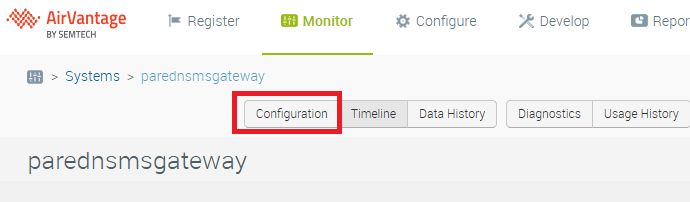
Try logging in to ACEManager using that password to see if it works. If it still doesn’t, please let me know.
Thanks,
Hi! I finally was able to login using the password that shows up on the configuration section of AirVantage. My question now is about the AT commands. Upon using a running python script that I use for another GSM modem, the Rv-55 gave me a not supported command for (Text Mode) CMGF=1
Is there a way to turn on this AT command by maybe updating the ALEOS firmware version or is there a special command to turn on Text Mode?
Thanks!
Lot Marquez
Hi @k6irf,
I found that you can login using the password that shows up on the configuration section of AirVantage. Regarding your question about the AT commands, please create a new post for your AT command question so I can better support you.
Thanks,
Hello, Support.
Trying to change password to default printed on sticker via edit configuration.
The password on sticker contain only digits and letters, but system show error “This field require at least 1 special character“
How to by pass this restriction?
Hi @andy.manager,
Could you share with me the image of both sides of your device? Additionally, could you tell me where you think the default password is in that image?
Thanks,